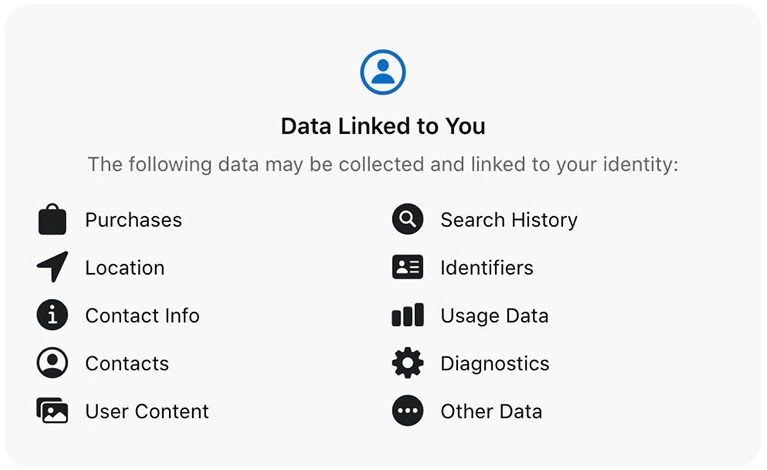
App Privacy details are part of an app’s product page on the App Store. They tell people which data the app and its third-party SDKs collect, whether that data is linked to them, and whether it is used for tracking.
The difficult part is not filling in the form. It is making sure the answers match the code that is actually shipped. Analytics, advertising, crash reporting, login providers and embedded SDKs all count.
Start with a data inventory
Before opening App Store Connect, list every place where the app reads, stores or transmits information. Include your own code and every third-party dependency.
- What data is collected?
- Why is it collected?
- Is it sent off the device?
- Is it linked to an account, device or identity?
- Is it used to track people across apps or websites?
- Which SDK or service receives it?
Apple requires the answers to include the practices of third-party partners whose code is integrated into the app. If one platform collects more data than another, the app-level answers must still describe the complete behaviour of the versions currently available.
Understand the three questions behind each label
Data collected
Apple asks about categories such as contact information, financial information, location, identifiers, purchases, usage data and diagnostics. Collection generally means that data is transmitted off the device and retained beyond the time needed to service the immediate request.
Data linked to the user
Data may be linked through an account, user ID, device identifier or other details. Removing a name does not automatically make data anonymous if it can still be associated with a person or device.
Data used for tracking
Tracking has a specific meaning in Apple’s rules. It includes linking data from the app with information from other companies for targeted advertising or advertising measurement, and sharing data with a data broker. App Tracking Transparency applies when the app wants permission to track.
Use the privacy report from Xcode
Privacy manifests do not replace the App Store labels. They provide information about data use and required-reason APIs inside the app and its dependencies. Xcode can combine those manifests into a privacy report.
- Archive the app in Xcode.
- Open the archive in Organizer.
- Control-click the archive and choose Generate Privacy Report.
- Compare the report with your data inventory and the answers in App Store Connect.
The report helps identify SDK declarations, but it cannot decide whether your answers are complete. You still need to understand how each dependency is configured and what happens at runtime.
Keep the privacy policy and product behaviour aligned
App Privacy details, the privacy policy and the app itself should describe the same behaviour. Review them whenever you add an SDK, enable advertising, introduce analytics, change account handling or move data to a new service.
A privacy policy URL is required for apps on the App Store. Apple also requires the policy to explain what data is collected, how it is used, which third parties receive it, how long it is retained and how people can withdraw consent or request deletion where applicable.
Security is a separate engineering task
Accurate disclosure does not secure the data. Use platform protection appropriate to the information you store. Credentials and small secrets belong in Keychain. Files can use Apple’s data-protection classes. Network traffic should use secure transport. Database protection depends on the storage technology and threat model; Core Data does not provide a general “enable encryption” switch.
A practical release check
- Review the data inventory with product and engineering.
- Check every third-party SDK and its current configuration.
- Generate and review the Xcode privacy report.
- Update App Store Connect before submitting the release.
- Confirm that the privacy policy and in-app controls still match the implementation.
Apple’s current guidance is available in Manage app privacy, Describing data use in privacy manifests and the App Review Guidelines.